
Create Beautiful AI Coloring Pages with Expert Prompting Tips
Looking to create unique, printable coloring pages using AI? You're in the right place! Our comprehensive guide will teach you how to craft the perfect prompts for AI coloring page generation.
Introduction
AI coloring page generators have revolutionized the way we create art, making it easier than ever to design beautiful and intricate coloring pages. However, the key to unlocking their full potential lies in how well you craft your prompts. Whether you're a beginner or an experienced user, these tips will help you draft better prompts for creating stunning AI-generated coloring pages.
Ready to try it yourself? Create your own AI coloring pages with our generator!
Tips for Better Results
1. Be Specific with Your Prompts
When drafting your prompts, specificity is key. The more details you provide, the more likely the AI will generate an image that matches your vision. For example:
✅ Good Prompts:
- "A majestic lion with a flowing mane standing in a savanna at sunset"
- "A cute cartoon elephant playing with colorful balloons in a circus tent"
❌ Bad Prompts:
- "A lion"
- "An elephant"
Why This Works: Specific prompts give the AI clear instructions about what elements to include in the coloring page, resulting in more detailed and engaging designs.
2. Use Descriptive Language
Descriptive language can significantly enhance the quality of your prompts. Use vivid adjectives and clear imagery to help the AI understand your vision.
✅ Good Examples:
- "A tall, majestic oak tree with intricate branches and detailed leaves"
- "A whimsical butterfly with delicate, pattern-filled wings"
❌ Avoid Vague Descriptions:
- "A tree with leaves"
- "A pretty butterfly"
3. Experiment with Variations
Don't hesitate to experiment with different variations of your prompts. If the first result isn't what you expected, try rephrasing or adding new elements.
Try These Variations:
- "A whimsical fairy garden with colorful flowers and butterflies"
- "A magical forest scene with glowing mushrooms and fireflies"
- "An enchanted garden with floating lanterns and dancing fairies"
Pro Tip: Experiment with different aspect ratios for various coloring page formats (square: "1:1" , portrait: "3:4", landscape: "4:3").
4. Incorporate Themes and Styles
Themes and styles help the AI understand the context and artistic direction you want to achieve.
Popular Themes:
- 🌟 Fantasy: "A magical unicorn in an enchanted crystal forest"
- 🌊 Ocean: "An underwater scene with detailed coral reefs and tropical fish"
- 🚀 Space: "A cosmic scene with detailed planets and swirling galaxies"
Style Examples:
- Cartoon: "cute", "simple lines", "child-friendly"
- Detailed: "intricate patterns", "mandala-style", "zentangle"
5. Avoid Negative Prompts
Instead of telling the AI what not to include, focus on what you want to see in the image.
✅ Good Prompts:
- "A female deer grazing in a meadow"
- "A baby deer with spotted fur"
❌ Bad Prompts:
- "A deer without antlers"
6. Try Our AI Prompt Refinement Tool
Enhance your prompts with our AI refinement tool. Simply input your basic prompt and watch it transform into a detailed, optimized version.
Example Transformation:
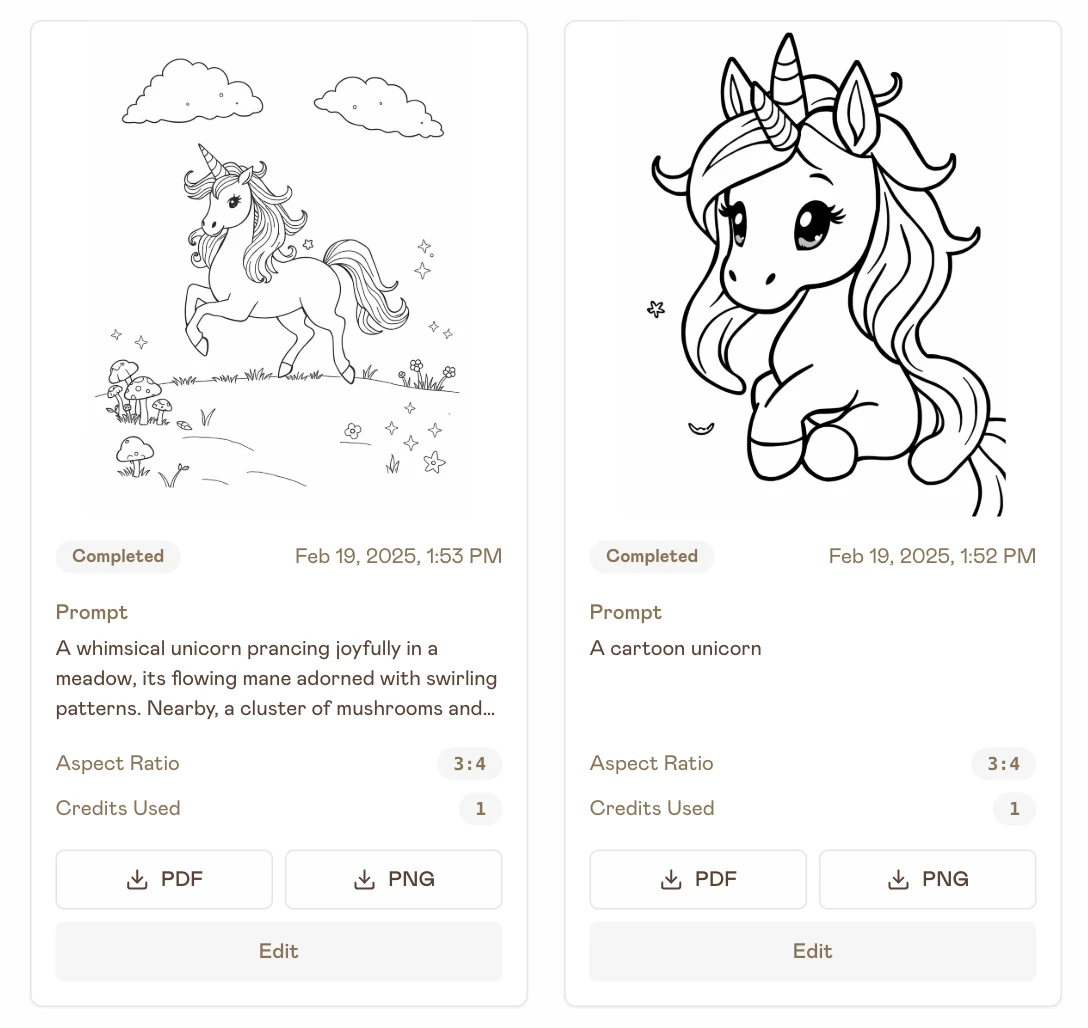
Original: "A cartoon unicorn"
Refined: "A whimsical unicorn prancing joyfully in a meadow, its flowing mane adorned with swirling patterns. Nearby, a cluster of mushrooms and sparkling stars dot the landscape while fluffy clouds drift lazily overhead."

See the difference in results:
Try It Yourself
Put these tips into practice and create your own unique coloring pages! Our AI coloring page generator makes it easy to bring your ideas to life.
Create Your First AI Coloring Page →
Conclusion
Mastering the art of prompt crafting is key to creating beautiful AI-generated coloring pages. By following these tips and practicing with different variations, you'll be able to generate stunning coloring pages that are perfect for both kids and adults.
Next Steps:
- Try our AI coloring page generator
- Browse our collection of free coloring pages for inspiration
- Share your creations with us on Pinterest and Twitter
Happy creating! 🎨